![Jirav-no-circle-two-color.png]](https://help.jirav.com/hs-fs/hubfs/Jirav-no-circle-two-color.png?height=40&name=Jirav-no-circle-two-color.png)
- Beginning Balance: Takes the first value in the period. Typically used for Balance Sheet accounts, such as Cash, to show starting balances
- Ending Balance: Takes the last value in the period. Typically for ending balance accounts, such as an Ending Customers Count)
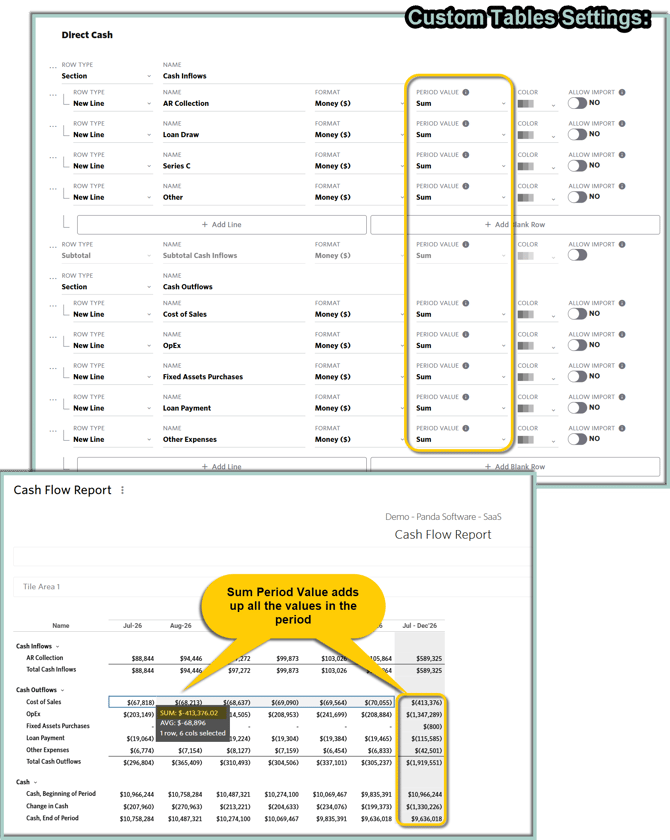
- Sum: Adds up all the values in the period. Ideal for Income Statement accounts, such as Revenue or Expenses.
- Average: Takes an average of all the values in the period. Often used for ratios or percentage metrics like Net Retention Rate.
- Formula Based: Selecting this option will correctly aggregate the underlying inputs for the formula for each month prior to evaluating the formula for the quarterly/half/annual summation. Best for lines with ratios or percentages calculated by a driver, such as Margins.
Be Aware:
- Formula Based Period Value does not support the aggregation of specialized Drivers based on Ranges other than "This Month"
- Learn more from the Formula Based Aggregations micro learning video
To configure the desired Period Value, navigate to Settings ⚙️> Custom Tables and choose the right option from the Period Value dropdown:

Beginning and Ending Balance Period Values
As mentioned above, the Beginning Balance Period Value captures the first value within the period, while the Ending Balance Period Value captures the last value within the period.
As shown in the screenshot below, the Period Value can be used to precisely determine the Cash balance at both the Beginning and End of the period for the Cash Flow Statement.

Sum Period Value
The Sum Period Value adds all values within the specified period. While it is typically used for Income Statement items, as shown in the screenshot below, it can also be used to summarize Cash Inflows and Cash Outflows for the period in the Cash Flow Statement.
Average and Formula Based Period Values
The Average Period Value calculates the average of all values within the period, while the Formula Based Period Value aggregates underlying inputs based on a formula, re-evaluating the formula for each period before summing.
Choosing the appropriate aggregation method is particularly important when presenting margins. Setting the Period Value for Margin to Average smooths out fluctuations across months, but it may not accurately reflect the full quarter’s performance, especially if one month experiences a significant drop in Gross Margin followed by a recovery.
For a more precise representation of the quarter, rather than averaging monthly margins, it’s better to configure the setup as Formula Based and evaluate it using the total Revenue and total COGS for the entire period. This approach provides a true reflection of the overall Margin performance.

Formula Based Period Value does not support the aggregation of specialized Drivers based on Ranges other than "This Month":

Learn more about Custom Tables: