![Jirav-no-circle-two-color.png]](https://help.jirav.com/hs-fs/hubfs/Jirav-no-circle-two-color.png?height=40&name=Jirav-no-circle-two-color.png)
Issue: Import failure due to discrepancies in the COA.
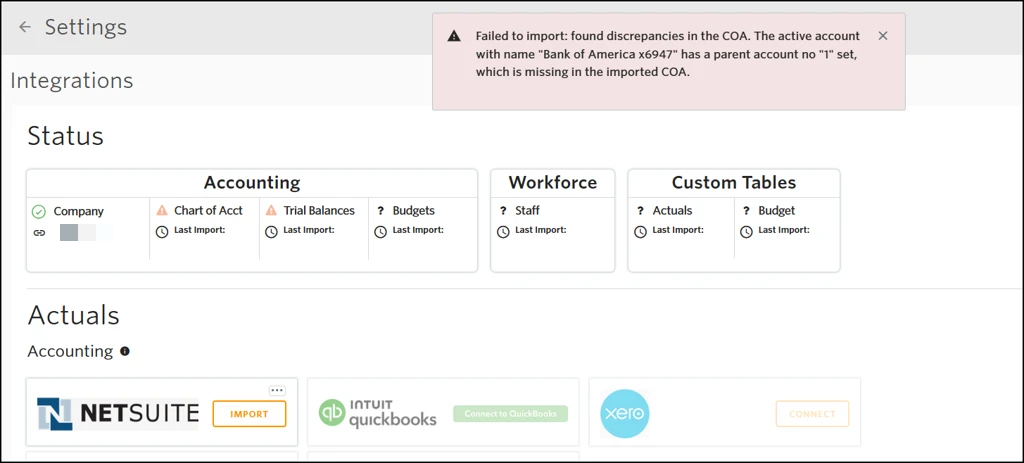
Cause:
This error can occur when there’s a role or permission-related visibility issue in NetSuite. The parent account exists in NetSuite, but it isn’t accessible to the role being used for the integration.
Resolution:
-
In NetSuite, update the parent account for the accounts identified in the error to one that exists within the subsidiary assigned to the Jirav integration role.
-
Reimport the data into Jirav.
If issues persist, please use this link to submit a support ticket or email us at support@jirav.com.
Issue: Discrepancy between NetSuite & Jirav Financials
Cause:
This can occur if transaction dates and posting periods are out of sync in NetSuite.
Resolution:
-
Review transactions in NetSuite to identify any mismatches between the transaction date and posting period.
-
Correct the discrepancies in NetSuite.
-
Reimport data into Jirav.
Once the data is reimported, Jirav should align with NetSuite.
If issues persist, please use this link to submit a support ticket or email us at support@jirav.com.